वंशावली — पूरा व्यावहारिक प्रशिक्षण

Vanshavali (Family Tree) — Full Training

दिनांक: 2026-10-16 · अनुमानित समय: 6 मिनट · पाठ 5

यह सुविधा क्या है

वंशावली आपके परिवार का वृक्ष है: मूल पूर्वज से आज की पीढ़ी तक। इसी से हर सदस्य का कानूनी हिस्सा (हक) हिंदू उत्तराधिकार अधिनियम (HSA) 2005 के अनुसार निकलता है। बंटवारा, बंटवारा पंचनामा और सर्वे के प्रपत्र, सब इसी वृक्ष से बनते हैं। हर खाते की एक ही वंशावली होती है।

उदाहरण: दादाजी के नाम 210 डिसमिल ज़मीन है। उनके तीन बेटे और एक बेटी थे; एक बेटे की मृत्यु हो चुकी है और उसकी पत्नी व दो बेटे जीवित हैं। किसका कितना हिस्सा बनेगा? वंशावली यह हिसाब अपने-आप करती है और हर सदस्य के कार्ड पर दिखाती है।
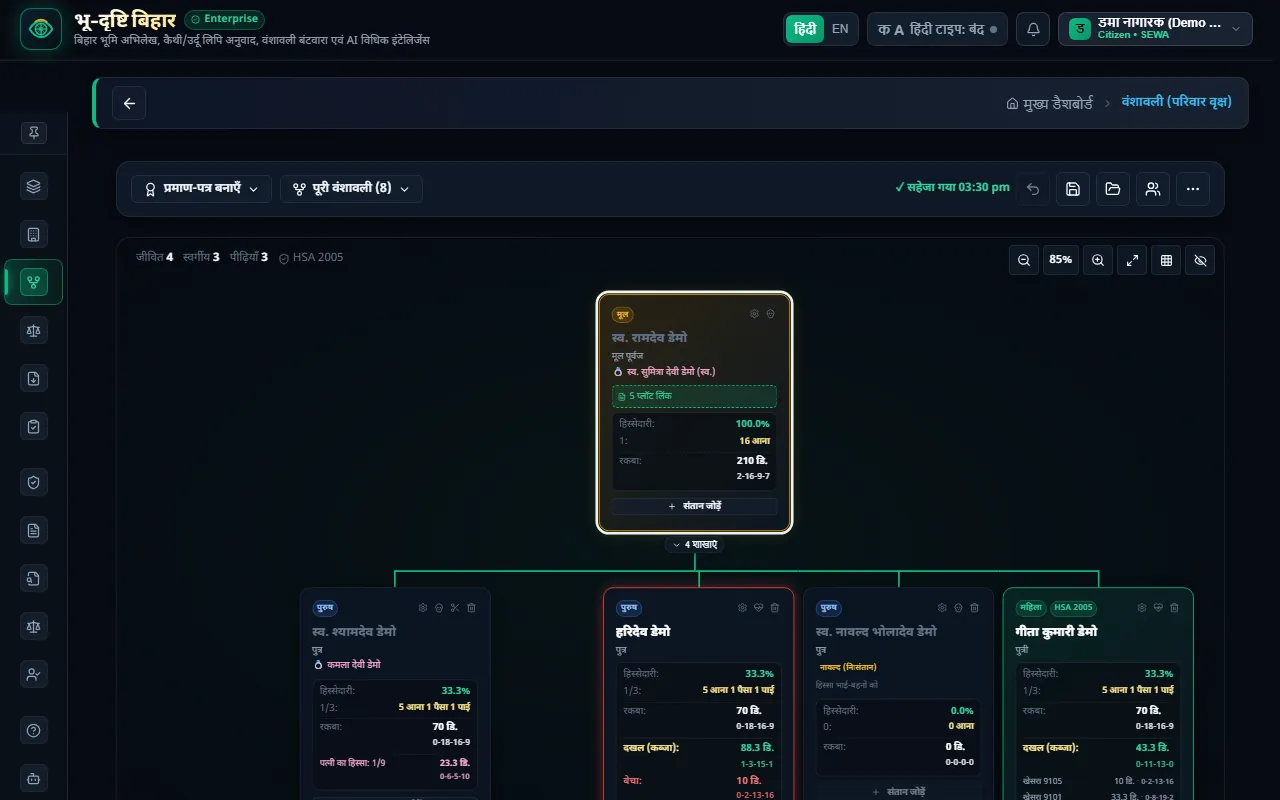
वंशावली — मूल पूर्वज से हर शाखा तक, हर सदस्य का हिस्सा कार्ड पर


शुरू करने से पहले

  1. संपत्ति एवं दस्तावेज़ वॉल्ट में अपने प्लॉट दर्ज करें। वृक्ष का कुल रकबा केवल उन्हीं प्लॉटों से बनता है जो किसी सदस्य से जुड़े हैं।
  2. परिवार के सदस्यों के नाम, आपसी संबंध, और कौन जीवित है, यह जानकारी तैयार रखें।

चरण-दर-चरण

1. पहली बार वंशावली बनाएँ

ऊपर दाईं ओर "⋯" दबाएँ:

  • "सरल वंशावली बनाएं": चार आसान चरणों में मूल पूर्वज, उनके बच्चे और आगे की पीढ़ी भरें।
  • "अभिलेखों से वंशावली बनाएँ": वॉल्ट के खतियान और प्लॉटों के मालिकों के नाम से वृक्ष अपने-आप बनता है। हर प्लॉट अपने मालिक-सदस्य से जुड़ जाता है।
  • "नई वंशावली शुरू करें": खाली वृक्ष से शुरुआत। पुरानी वंशावली "पिछली" के रूप में सुरक्षित रहती है और ⋯ से वापस लाई जा सकती है।
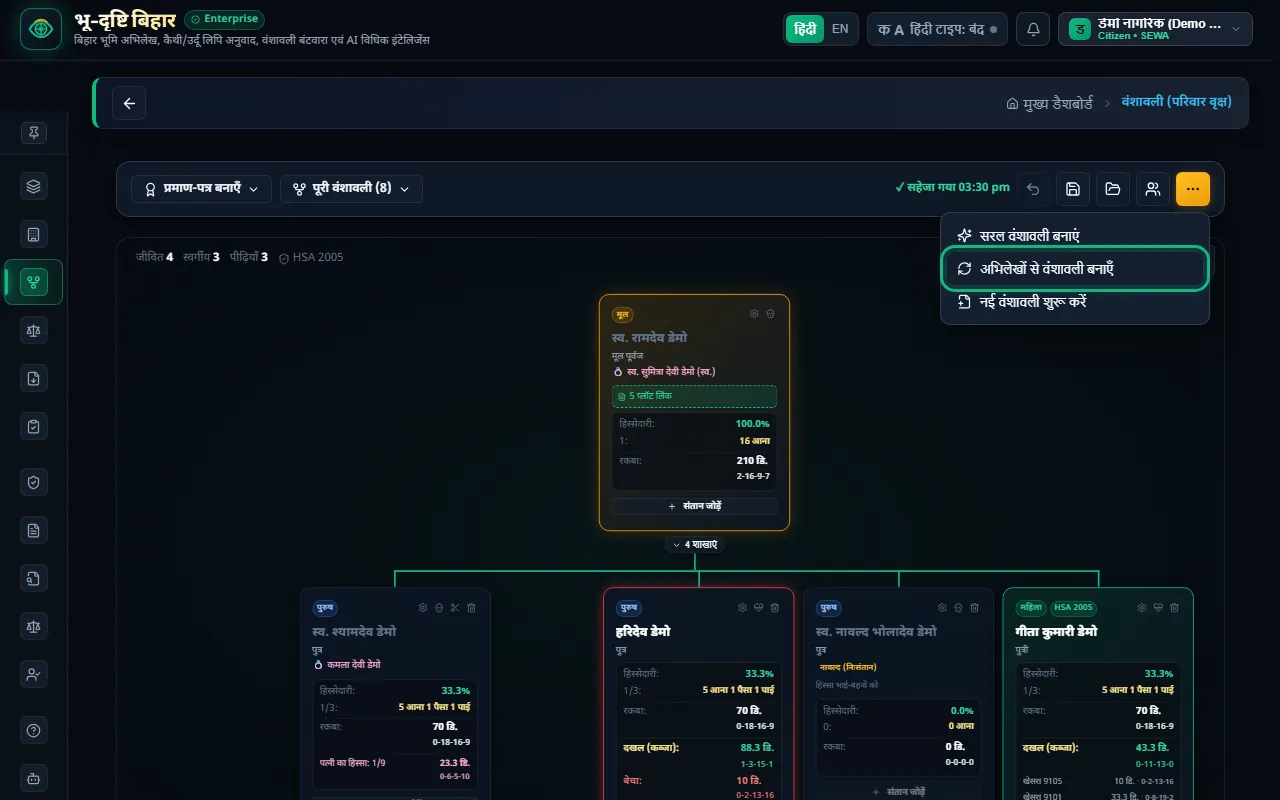
⋯ मेनू — सरल वंशावली, अभिलेखों से वंशावली, नई वंशावली

2. सदस्य जोड़ें और बदलें

  • किसी सदस्य के कार्ड पर "+ संतान जोड़ें" से उनका बेटा या बेटी जोड़ें।
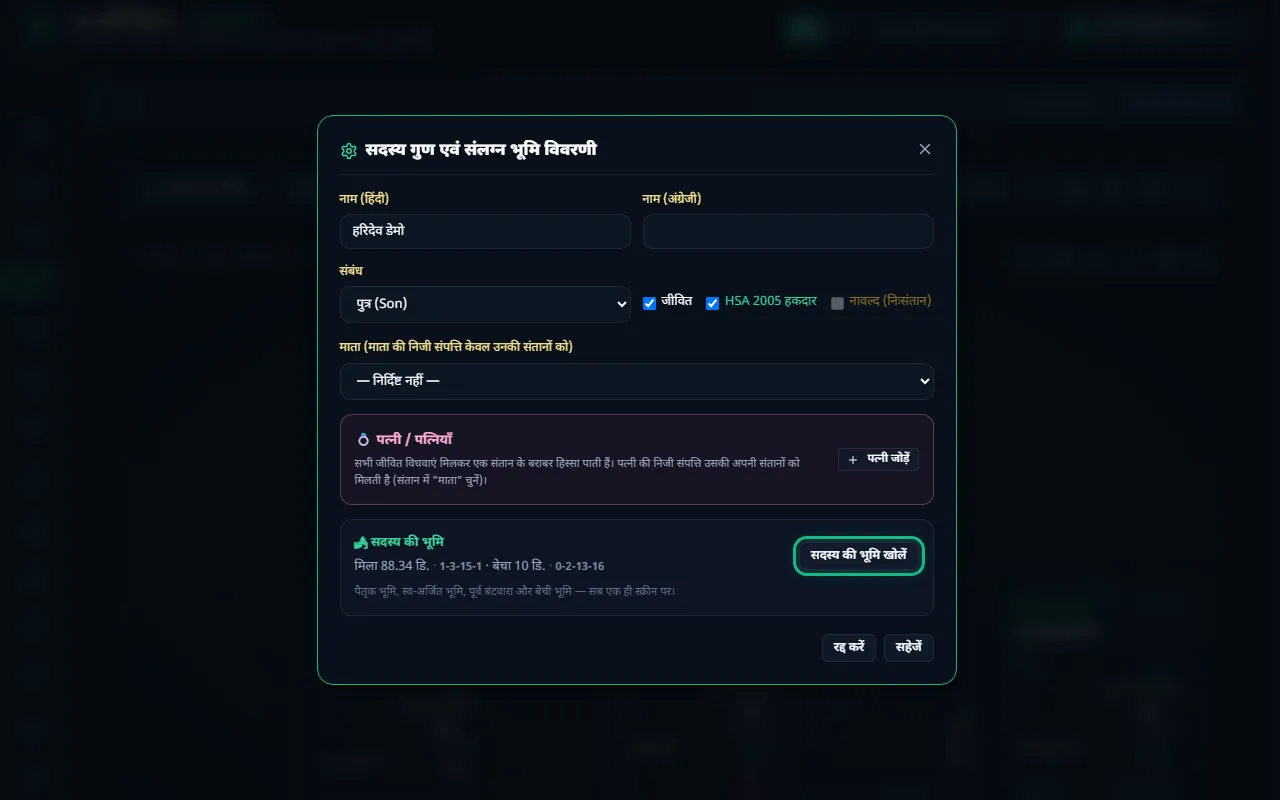
  • कार्ड पर ⚙ दबाकर सदस्य का विवरण खोलें: नाम (हिंदी और अंग्रेज़ी), संबंध, "जीवित", "HSA 2005 हकदार", "नावल्द (निःसंतान)", और माता।
  • उसी खिड़की में "पत्नी जोड़ें" से पत्नी जोड़ें। एक पुरुष की एक से अधिक पत्नियाँ जोड़ी जा सकती हैं।
  • "सदस्य की भूमि खोलें" से उस सदस्य की सारी भूमि एक स्क्रीन पर देखें: पैतृक, स्व-अर्जित, पूर्व बंटवारा और बेची भूमि।
  • अंत में "सहेजें" दबाएँ।

सदस्य का विवरण — संबंध, जीवित, नावल्द, पत्नी और सदस्य की भूमि

3. हिस्सा पढ़ें

हर कार्ड पर दिखता है:

  • हिस्सेदारी: प्रतिशत और आना में (16 आना = पूरा, 100%)
  • रकबा: इस हिस्से से बनने वाली भूमि, डिसमिल और बीघा-कट्ठा-धुर में
  • दखल (कब्ज़ा): जो भूमि इन्हें असल में मिली है
  • बेचा: जो इन्होंने बेच दी
  • कम या अधिक मिला हो तो लाल या पीले रंग में "अधिक हिस्सा" या "कम"
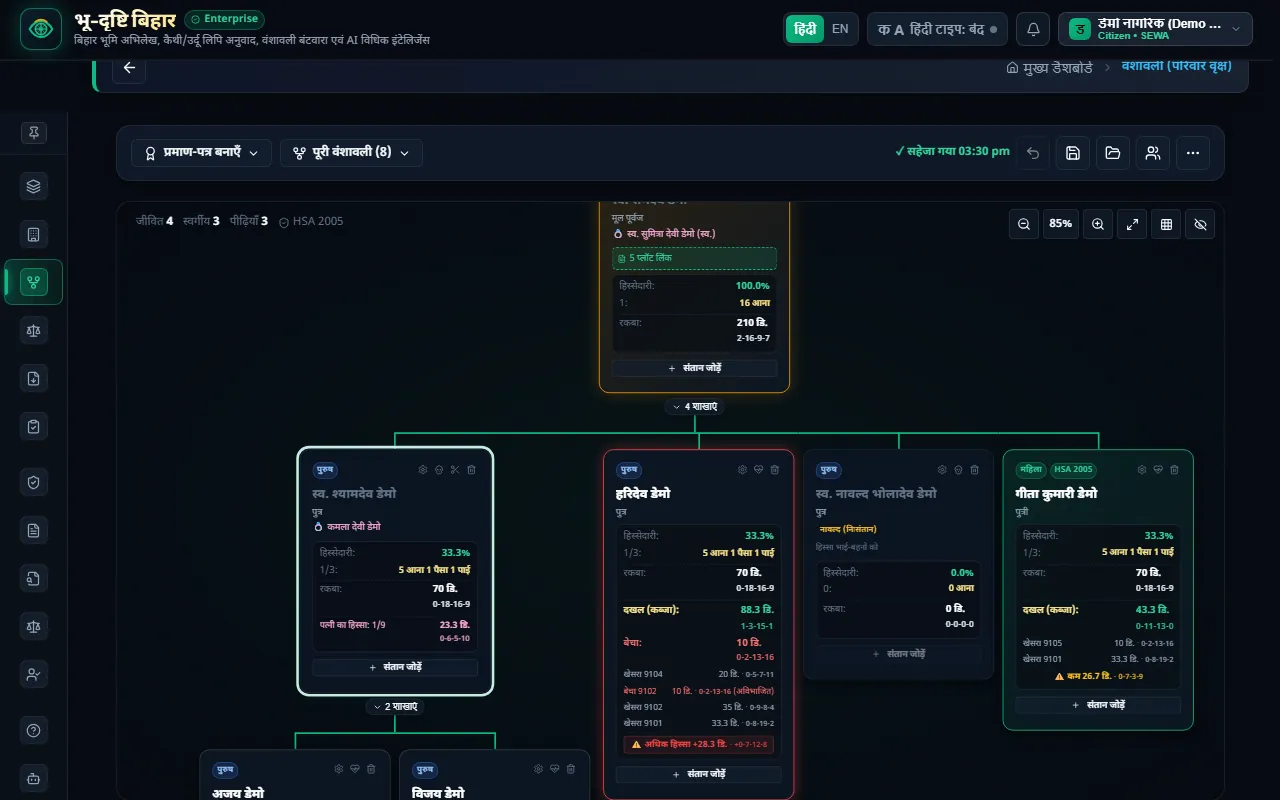
हर कार्ड पर हिस्सेदारी, रकबा, दखल और बेचा; विधवा का हिस्सा भी

4. प्रमाण-पत्र और प्रपत्र बनाएँ

ऊपर बाईं ओर "प्रमाण-पत्र बनाएँ" दबाएँ:

  • "वंशावली प्रमाण-पत्र बनाएं": एक पन्ने का प्रमाण-पत्र
  • "वंशावली प्रमाण-पत्र (6-पृष्ठ)": पूरा कानूनी भिन्न-हिस्सा सहित
  • "प्रपत्र-2 बनाएं": विशेष भूमि सर्वेक्षण का प्रपत्र

बड़े परिवार में "पूरी वंशावली" से केवल एक शाखा चुनकर देखें। ज़ूम, "स्क्रीन फिट" और "सभी शाखाएं समेटें" से बड़ा वृक्ष आसानी से देखा जा सकता है।
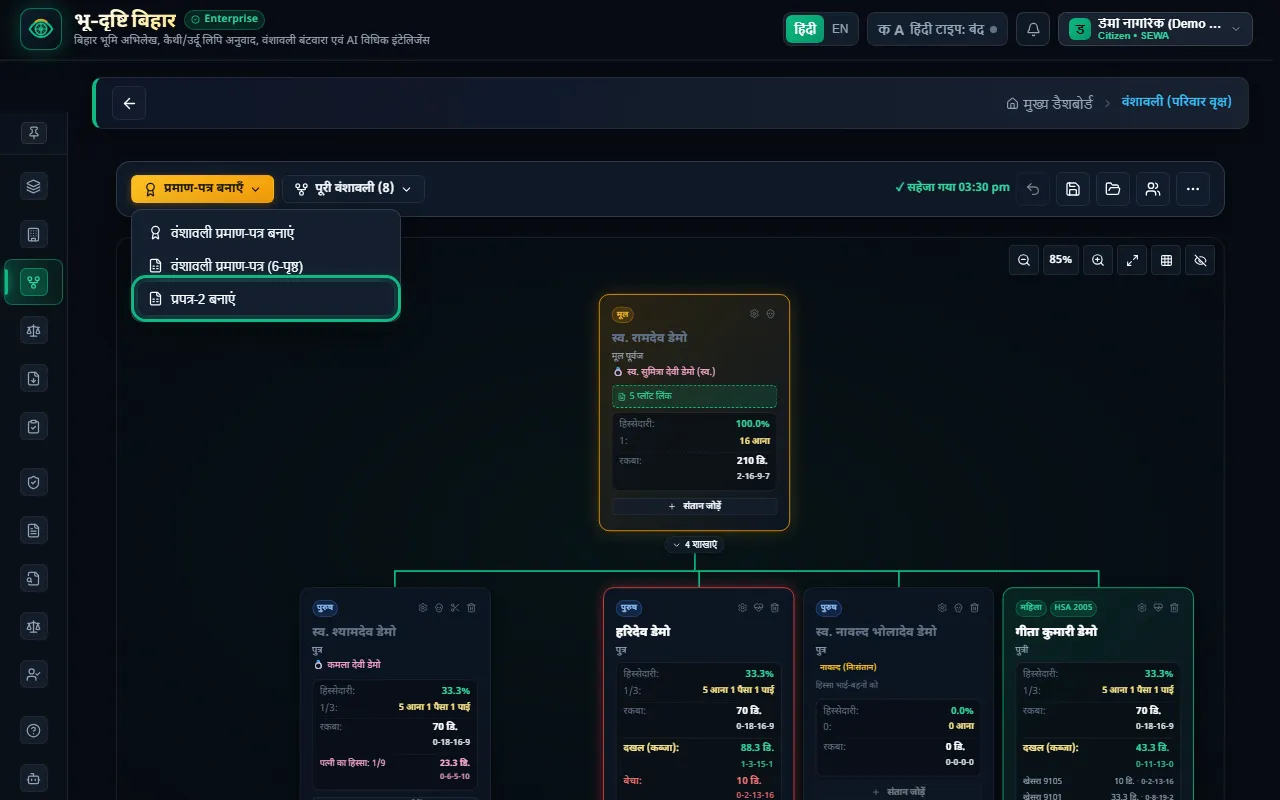
प्रमाण-पत्र बनाएँ — वंशावली प्रमाण-पत्र और प्रपत्र-2


हिस्सा कैसे निकलता है

डेमो परिवार से समझें। मूल पूर्वज स्व. रामदेव डेमो के चार बच्चे हैं:

  • नावल्द (निःसंतान) बेटा: उनकी कोई संतान नहीं, इसलिए उनका हिस्सा भाई-बहनों में चला जाता है। उनका हिस्सा 0 दिखता है।
  • बाकी तीन बच्चों (दो बेटे और बेटी) को बराबर 1/3 मिलता है। HSA 2005 के अनुसार बेटी को बेटे के बराबर हिस्सा मिलता है।
  • स्व. श्यामदेव का 1/3 उनकी जीवित पत्नी और दो बेटों में बराबर बँटता है। जीवित पत्नी (या सभी जीवित विधवाएँ मिलकर) एक संतान के बराबर हिस्सा पाती हैं, इसलिए पत्नी का हिस्सा 1/9 है।

और नियम:

  • हर शाखा में ऊपर से नीचे चलते हुए पहला जीवित व्यक्ति उस शाखा का वारिस होता है। जीवित पिता की संतानों का हिस्सा "भविष्य हेतु" हल्का दिखता है; उन्हें अभी भूमि नहीं दी जा सकती।
  • पत्नी की निजी भूमि उन्हीं के पास रहती है और केवल उनकी अपनी संतानों को जाती है (सदस्य में "माता" चुनें)।
  • पूर्व बंटवारा और परिवार में बेची भूमि बंटवारा आवंटन में दर्ज होती है।

आम गलतियाँ और समाधान

  • समस्या: वृक्ष का कुल रकबा 0 या कम दिख रहा है।

    • समाधान: रकबा केवल उन वॉल्ट प्लॉटों से आता है जो किसी सदस्य से जुड़े हैं। वॉल्ट में प्लॉट खोलकर "२. पूर्वज / स्वामित्व" टैब में सदस्य चुनें।
  • समस्या: मेरे बेटे का हिस्सा क्यों नहीं दिख रहा?

    • समाधान: आप जीवित हैं, इसलिए अपनी शाखा के वारिस आप हैं। बेटे का हिस्सा "भविष्य हेतु" हल्का दिखता है।
  • समस्या: गलती से नई वंशावली शुरू हो गई।

    • समाधान: ⋯ → "पिछली वंशावली वापस लाएं"। पुरानी वंशावली सुरक्षित रहती है।
  • समस्या: बंटवारा स्क्रीन पर सदस्य जोड़ने के बटन नहीं हैं।

    • समाधान: सदस्य केवल वंशावली (वृक्ष) स्क्रीन पर जोड़े जाते हैं। बंटवारा स्क्रीन पर "वंशावली देखें" दबाएँ।

ध्यान रखें

  • कानूनी आधार: हिस्से हिंदू उत्तराधिकार अधिनियम 2005 के अनुसार निकलते हैं। यह जानकारी समझ और पारिवारिक सहमति के लिए है, कानूनी सलाह नहीं। विवाद हो तो वकील से सलाह लें।
  • सही जानकारी ज़रूरी: किसी सदस्य को गलत "जीवित" या "स्वर्गीय" चिह्नित करने से सबके हिस्से बदल जाते हैं। हर बदलाव के बाद हिस्से जाँच लें।
  • वंशावली अपने-आप सहेजी जाती है: ऊपर "सहेजा गया" दिखता है। फिर भी बड़े बदलाव के बाद 💾 दबा दें।

अगला पाठ

अगले पाठ में सीखें कि वंशावली के अनुसार पैतृक भूमि को वारिसों में कैसे बाँटें: **पाठ 6: बंटवारा आवंटन**।


भू-दृष्टि एक निजी सेवा है — सरकारी पोर्टल नहीं।

Vanshavali (Family Tree) — Full Training — English

What this feature is

The Vanshavali is your family tree, from the first ancestor down to today's generation. Each member's legal share is worked out from it under the Hindu Succession Act (HSA) 2005. The partition (bantwara), the partition Panchnama and the survey forms are all built from this tree. Each account has one Vanshavali.

Example: your grandfather holds 210 decimals of land. He had three sons and a daughter. One son has died, and his wife and two sons are living. Who gets how much? The Vanshavali works this out automatically and shows it on each member's card.

The Vanshavali — from the first ancestor to every branch, each member's share on their card


Before you start

  1. Enter your plots in the Property & Document Vault. The tree's total area (rakba) comes only from plots linked to a member.
  2. Have ready the names of family members, how they are related, and who is living.

Step by step

1. Make your Vanshavali for the first time

Press "⋯" at the top right:

  • "सरल वंशावली बनाएं" (simple Vanshavali): fill in the first ancestor, his children and the next generation in four easy steps.
  • "अभिलेखों से वंशावली बनाएँ" (build from records): the tree is built from the owners' names on the khatians and plots in your vault. Each plot is linked to its owner.
  • "नई वंशावली शुरू करें" (start a new Vanshavali): start from an empty tree. The old one is kept as "previous" and can be brought back from ⋯.

The ⋯ menu — simple Vanshavali, build from records, new Vanshavali

2. Add and edit members

  • Press "+ संतान जोड़ें" (add child) on a member's card to add their son or daughter.
  • Press ⚙ on a card to open the member's details: name (Hindi and English), relation, "जीवित" (living), "HSA 2005 हकदार" (HSA 2005 coparcener), "नावल्द (निःसंतान)" (issueless), and mother.
  • In the same window, "पत्नी जोड़ें" (add wife) adds a wife. A man can have more than one wife.
  • "सदस्य की भूमि खोलें" (open member's land) shows all of that member's land on one screen: ancestral, self-acquired, earlier partition and sold.
  • Finally press "सहेजें" (save).

Member details — relation, living, issueless, wife and the member's land

3. Read the shares

Each card shows:

  • हिस्सेदारी (share): as a percentage and in anna (16 anna = the whole, 100%)
  • रकबा (area): the land this share comes to, in decimals and bigha-kattha-dhur
  • दखल (possession): the land they actually hold
  • बेचा (sold): what they have sold
  • If they hold less or more than their share, "कम" (short) or "अधिक हिस्सा" (over-share) in yellow or red

Each card shows share, area, possession and sold land — and the widow's share

4. Make certificates and forms

Press "प्रमाण-पत्र बनाएँ" (make certificate) at the top left:

  • "वंशावली प्रमाण-पत्र बनाएं": a one-page Vanshavali certificate
  • "वंशावली प्रमाण-पत्र (6-पृष्ठ)": the full 6-page version with the exact legal fractions
  • "प्रपत्र-2 बनाएं": the special land survey's Prapatra-2 form

In a large family, use "पूरी वंशावली" (whole Vanshavali) to view just one branch. Zoom, "screen fit" and "collapse all branches" make a big tree easy to read.

Make certificate — Vanshavali certificate and Prapatra-2


How the shares are worked out

Take the demo family. The first ancestor, the late Ramdev Demo, has four children:

  • The issueless (नावल्द) son: he has no children, so his share passes to his brothers and sister. His share shows as 0.
  • The other three children (two sons and the daughter) get an equal 1/3 each. Under HSA 2005, a daughter gets the same share as a son.
  • The late Shyamdev's 1/3 is divided equally between his living wife and his two sons. A living wife (or all living widows together) takes a share equal to one child, so the wife's share is 1/9.

More rules:

  • Going down each branch, the first living person is that branch's heir. The children of a living father see their share only faintly as a "future share" (भविष्य हेतु); they cannot be given land yet.
  • A wife's own land stays with her and passes only to her own children (choose "माता" (mother) on the member).
  • Earlier partitions and land sold within the family are recorded in Bantwara Allocation.

Common mistakes and fixes

  • Problem: the tree's total area shows 0 or too little.

    • Fix: area comes only from vault plots linked to a member. Open the plot in the vault and choose the member on the "२. पूर्वज / स्वामित्व" (ancestor / owner) tab.
  • Problem: why doesn't my son have a share?

    • Fix: you are living, so you are your branch's heir. Your son's share shows faintly as a "future share".
  • Problem: I started a new Vanshavali by mistake.

    • Fix: ⋯ → "पिछली वंशावली वापस लाएं" (restore previous Vanshavali). The old one is kept safe.
  • Problem: there are no buttons to add members on the Bantwara screen.

    • Fix: members are added only on the Vanshavali (tree) screen. On the Bantwara screen press "वंशावली देखें" (view Vanshavali).

Keep in mind

  • Legal basis: shares follow the Hindu Succession Act 2005. This is for understanding and family agreement, not legal advice. If there is a dispute, consult a lawyer.
  • Correct details matter: marking someone wrongly as living or deceased changes everyone's share. Check the shares after every change.
  • The Vanshavali saves itself: "सहेजा गया" (saved) shows at the top. Still, press 💾 after a big change.

Next lesson

In the next lesson, learn how to divide the ancestral land among the heirs according to the Vanshavali: **Lesson 6: Bantwara Allocation**.


BhuDrishti is a private service — not a government portal.

भू-दृष्टि बिहार एक निजी सेवा है, सरकारी पोर्टल नहीं। BhuDrishti Bihar is an independent private service, not a government portal.