प्रपत्र-21 (दावा / आपत्ति) — पूरा व्यावहारिक प्रशिक्षण

Prapatra-21 (Claim / Objection) — Full Training

दिनांक: 2026-10-16 · अनुमानित समय: 5 मिनट · पाठ 8

यह सुविधा क्या है

बिहार विशेष भूमि सर्वेक्षण के अंत में अधिकार-अभिलेख (नया खतियान) प्रपत्र-20 के रूप में प्रकाशित होता है। अगर उसमें आपकी ज़मीन गलत दर्ज हुई है, जैसे बंटवारे में मिला आपका हिस्सा आपके नाम नहीं चढ़ा, तो आप प्रपत्र-21 में दावा या आपत्ति देते हैं।

भू-दृष्टि यह प्रपत्र आपकी वंशावली, बंटवारे और वॉल्ट से अपने-आप भर देता है: दावाकर्ता, भूमि स्वामी, हर प्लॉट का खाता, खेसरा, रकबा और चौहद्दी, और "अपेक्षित राहत"। फिर आप उसे सरकारी प्रारूप में हिंदी या अंग्रेज़ी में प्रिंट कर सकते हैं।

उदाहरण: दादाजी की ज़मीन का बंटवारा हुआ और आपको तीन खेसरों में हिस्सा मिला, पर प्रपत्र-20 में ज़मीन अब भी दादाजी के नाम है। प्रपत्र-21 में आप माँग करते हैं कि आपके हिस्से के लिए आपके नाम से नई जमाबंदी खुले।
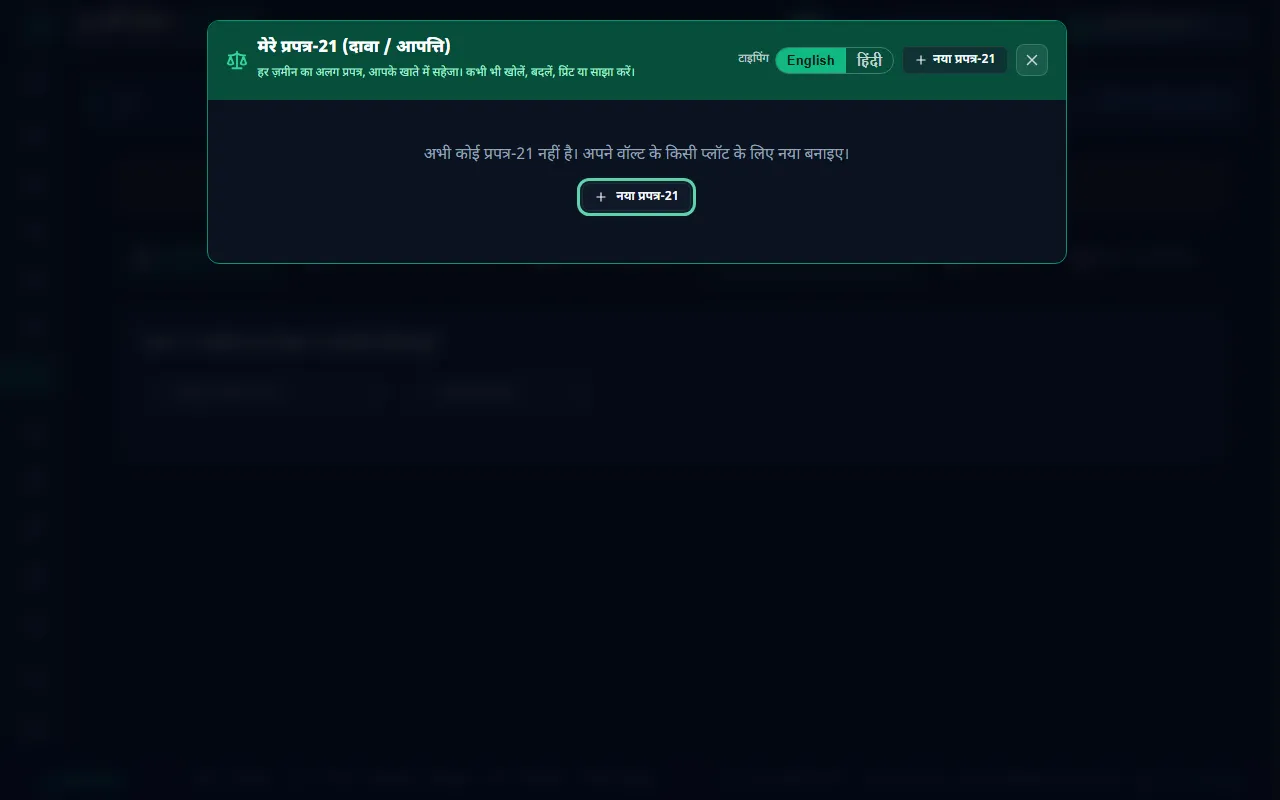
मेरे प्रपत्र-21 — हर ज़मीन का अलग प्रपत्र, आपके खाते में सहेजा


शुरू करने से पहले

  1. वॉल्ट में प्लॉट दर्ज हों, वंशावली बनी हो, और बंटवारा आवंटन में आपत्ति करने वाले सदस्य को उसका हिस्सा दिया गया हो। प्रपत्र इन्हीं से भरता है।
  2. दावाकर्ता का आधार नंबर पास रखें। प्रिंट या डाउनलोड के लिए यह ज़रूरी है।
  3. प्रपत्र-20 (अंतिम प्रकाशित खतियान) की प्रति देख लें, ताकि गलत प्रविष्टि सही लिख सकें।

चरण-दर-चरण

1. नया प्रपत्र खोलें

  1. "सर्वेक्षण सहायिका" खोलें और ऊपर "⚖️ प्रपत्र-21 (बन्दोबस्त आपत्ति)" दबाएँ।
  2. "मेरे प्रपत्र-21" में आपके सहेजे प्रपत्र दिखते हैं। हर ज़मीन का अलग प्रपत्र रहता है, जिसे कभी भी खोलकर बदल, प्रिंट या साझा कर सकते हैं।
  3. "नया प्रपत्र-21" दबाएँ।

2. बताएँ आपत्ति किसकी ओर से है

  1. "यह आपत्ति किसकी ओर से है?" में वंशावली का वह सदस्य चुनें जो आपत्ति कर रहा है।
  2. उस सदस्य के बंटवारे वाले प्लॉट दिखते हैं, हर प्लॉट में उसका हिस्सा रकबा और पूरे प्लॉट का रकबा। जो प्लॉट शामिल करने हैं, उन पर ✓ रहने दें। बेची गई भूमि यहाँ नहीं आती।
  3. "प्रपत्र में भरें" दबाएँ।

वंशावली न हो तो "भूमि से भरें (बिना वंशावली)" से सीधे वॉल्ट के प्लॉट चुनें, या "खाली प्रपत्र से शुरू करें"।
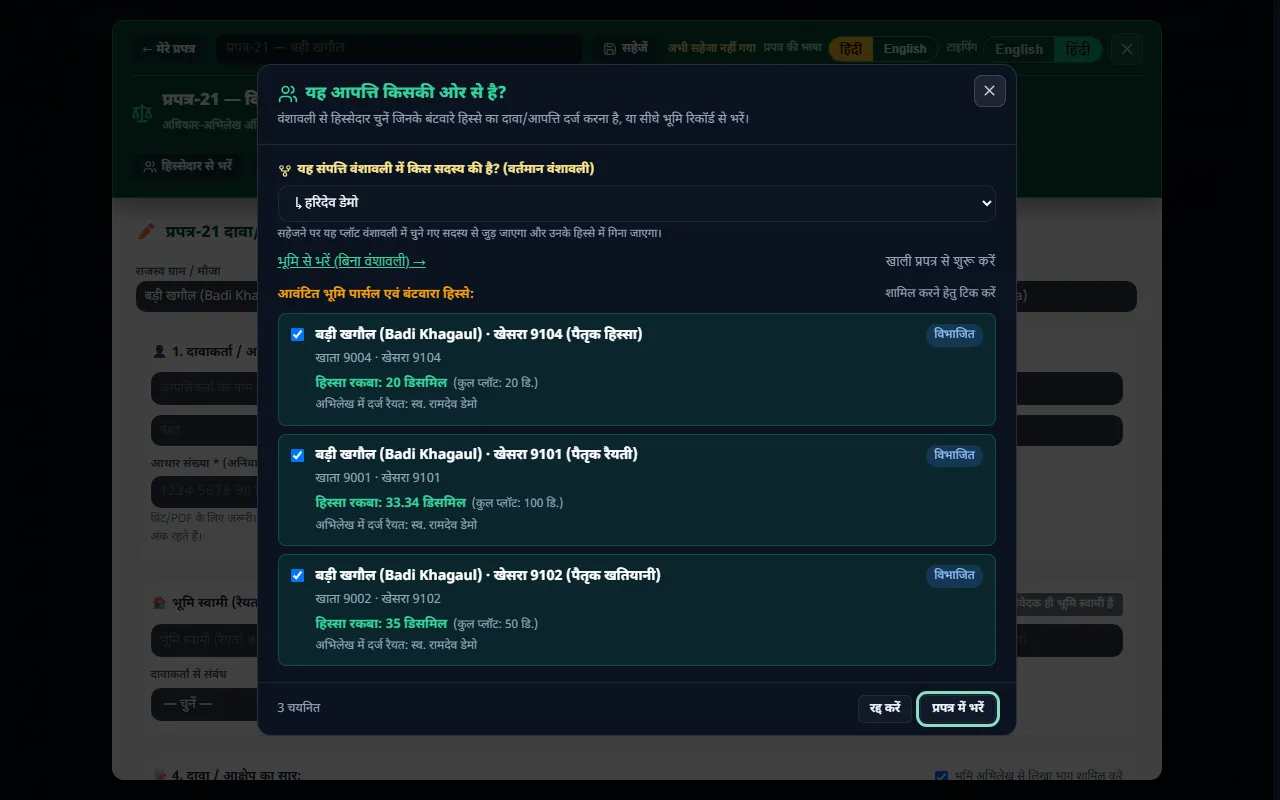
सदस्य चुनें — उसके बंटवारे के प्लॉट और हिस्सा रकबा

3. प्रपत्र जाँचें और पूरा करें

"✏️ संपादन" में हर भाग भरा हुआ मिलता है। इन्हें जाँचें:

  • दावाकर्ता: नाम, पिता/पति, पेशा, और आधार संख्या। पूरा आधार नंबर केवल आपके ब्राउज़र में रहता है; सहेजे प्रपत्र में केवल अंतिम चार अंक रहते हैं।
  • भूमि स्वामी (रैयत): जिनके नाम ज़मीन दर्ज है।
  • दावा / आक्षेप का सार: ऊपर का भाग भूमि अभिलेख से लिखा होता है। नीचे "आपका अपना विवरण" में अपनी बात अपने शब्दों में लिखें।
  • अपेक्षित राहत: आप क्या चाहते हैं, जैसे "नई जमाबंदी खोली जाए"।
  • अनुसूची — विवादित भूमि: हर प्लॉट का हाल और साबिक खाता-खेसरा, रकबा, चौहद्दी, "प्रपत्र-20 में वर्तमान (गलत) प्रविष्टि" और "वांछित शुद्ध प्रविष्टि"।
  • दावा / आपत्ति के आधार: "📋 सामान्य आधार चुनें" से तैयार आधार जोड़ें, या "आधार जोड़ें" से अपना लिखें।
  • संलग्न दस्तावेज़: जो कागज़ साथ लगा रहे हैं, उन पर ✓ लगाएँ।

वॉल्ट में कोई सुधार किया हो, तो "↻ भूमि अभिलेख से ताज़ा करें" दबाएँ। ऊपर का भाग नया भर जाता है, आपका अपना लिखा भाग नहीं बदलता।
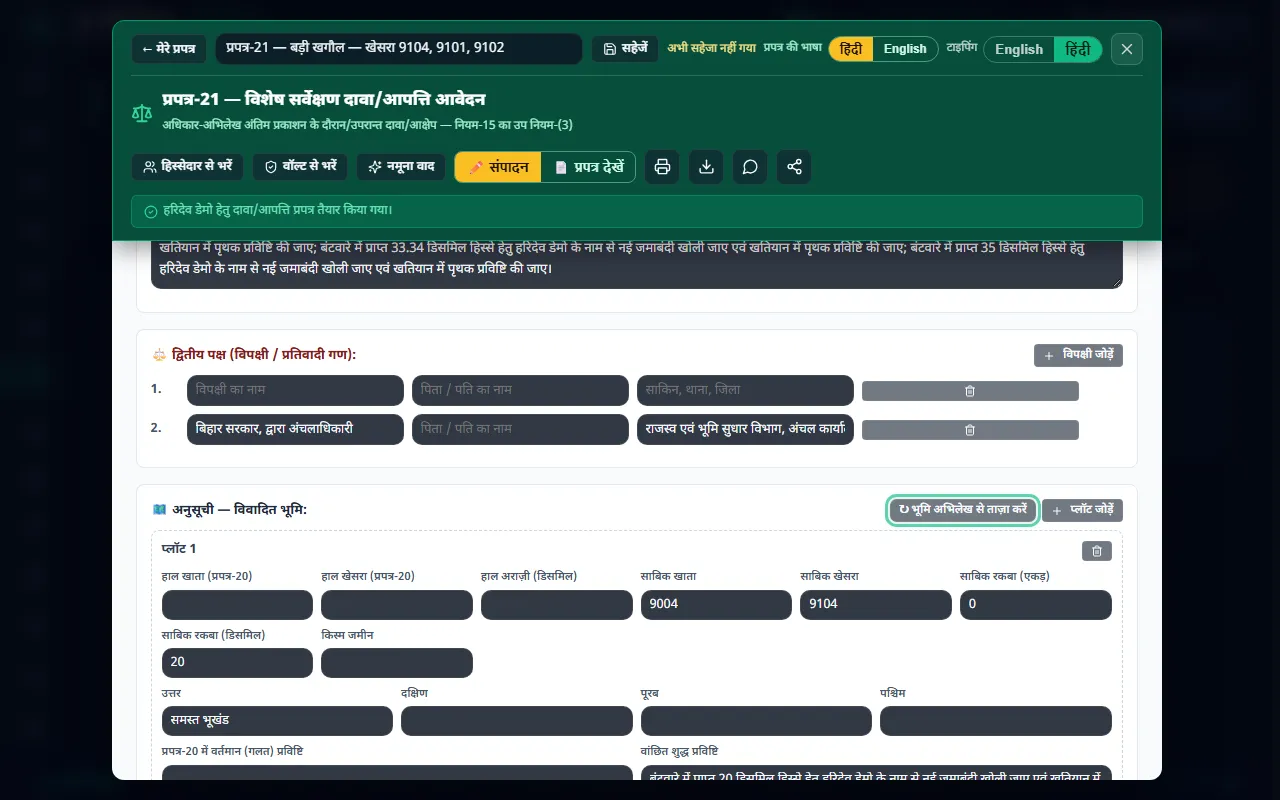
संपादन — हर भाग भरा हुआ; "भूमि अभिलेख से ताज़ा करें"

4. सरकारी प्रारूप देखें

"📄 प्रपत्र देखें" दबाएँ। प्रपत्र उसी प्रारूप में दिखता है जिसमें जमा होता है: दावाकर्ता, प्रतिवादी (बिहार सरकार, द्वारा अंचलाधिकारी), विवादित भूमि की तालिका, दावे का सार और अपेक्षित राहत।
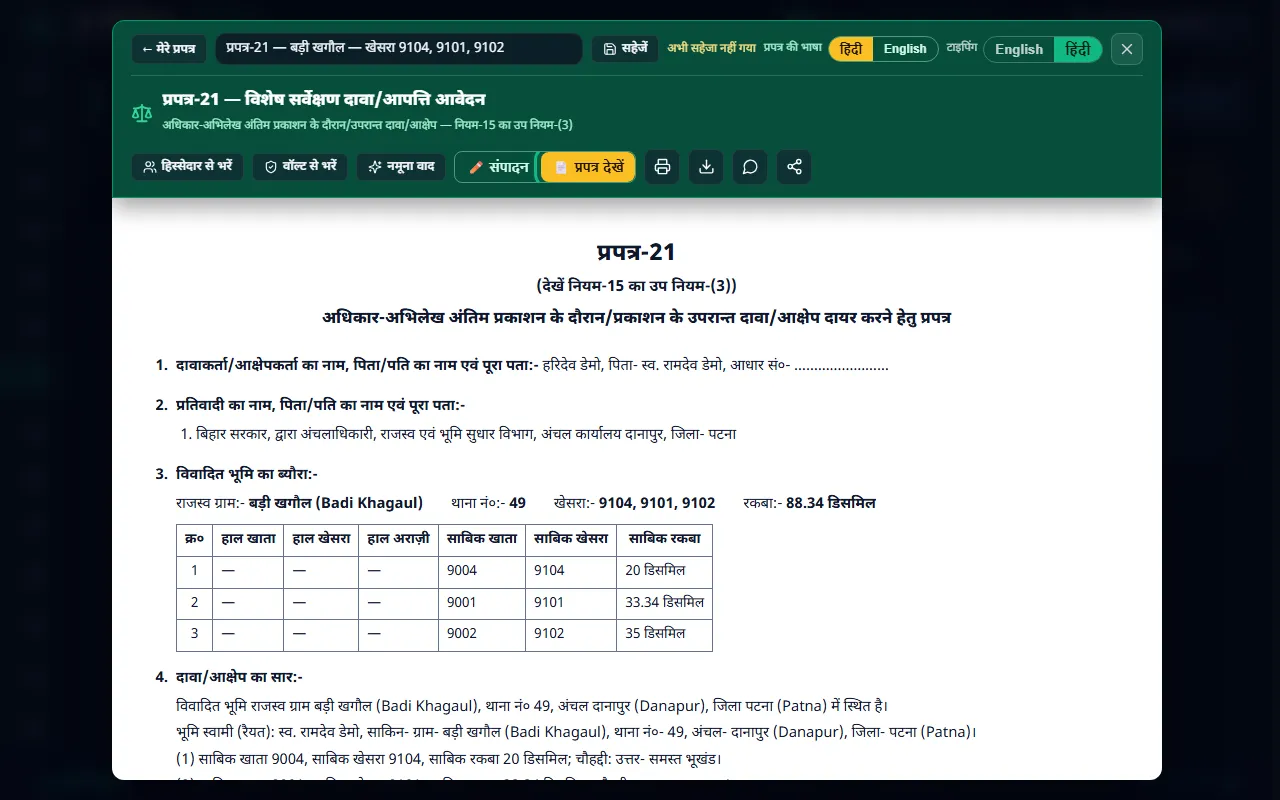
सरकारी प्रारूप में प्रपत्र-21

5. हिंदी या अंग्रेज़ी में

ऊपर "प्रपत्र की भाषा" में हिंदी या English चुनें। प्रपत्र के शीर्षक, खाने और ऐप का लिखा पूरा पाठ उसी भाषा में बदल जाता है। नाम और जगहों के नाम वैसे ही रहते हैं जैसे दर्ज हैं, और आपका अपना लिखा भाग नहीं बदलता। "टाइपिंग" से चुनें कि आप हिंदी में टाइप करेंगे या अंग्रेज़ी में।
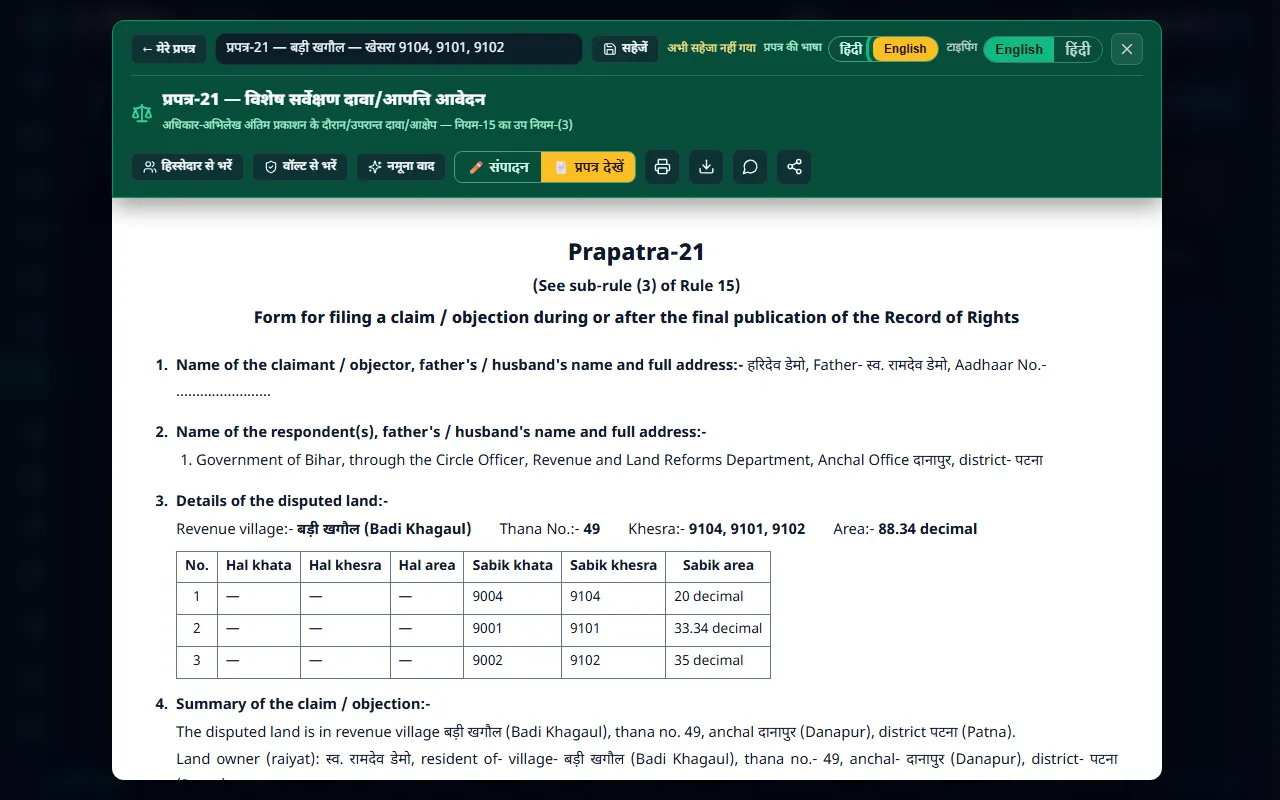
English में प्रपत्र-21

6. सहेजें, प्रिंट करें, भेजें

  • "सहेजें" दबाएँ। प्रपत्र "मेरे प्रपत्र-21" में रहता है।
  • 🖨 प्रिंट, ⬇ PDF डाउनलोड, 💬 WhatsApp या साझा करें।
  • प्रिंट पर दावाकर्ता हस्ताक्षर या अंगूठे का निशान लगाकर शिविर में जमा करें।

आम गलतियाँ और समाधान

  • समस्या: सदस्य चुनने पर कोई प्लॉट नहीं दिखा।

    • समाधान: उस सदस्य को बंटवारे में अभी कोई हिस्सा नहीं मिला है। पहले बंटवारा आवंटन में उसे भूमि दें। बेची गई भूमि यहाँ नहीं दिखती।
  • समस्या: चौहद्दी गलत या उलटी दिख रही है।

    • समाधान: वॉल्ट में प्लॉट के "३. चौहद्दी" टैब में सुधारें, फिर प्रपत्र में "↻ भूमि अभिलेख से ताज़ा करें" दबाएँ।
  • समस्या: "ताज़ा करें" से मेरा अपना लिखा मिट जाएगा?

    • समाधान: नहीं। केवल भूमि अभिलेख वाला भाग नया भरता है।
  • समस्या: प्रिंट या डाउनलोड नहीं हो रहा।

    • समाधान: दावाकर्ता का पूरा आधार नंबर भरें। सहेजे प्रपत्र को दोबारा खोलने पर यह फिर से पूछा जाता है।

ध्यान रखें

  • यह मसौदा है: भू-दृष्टि का तैयार प्रपत्र एक प्रारंभिक मसौदा है। जमा करने से पहले अंचल या शिविर कार्यालय से पुष्टि करें, और ज़रूरत हो तो पंजीकृत अधिवक्ता से सलाह लें।
  • समय-सीमा: आपत्ति की तिथि शिविर की सूचना से जाँचें। देर होने पर आपत्ति स्वीकार नहीं हो सकती।
  • कागज़ साथ रखें: प्रपत्र-20 की प्रति, केवाला, खतियान, लगान रसीद और वंशावली की प्रतियाँ साथ लगाएँ।

अगला पाठ

बंटवारा अभी बाकी है? पहले सीखें: **पाठ 6: बंटवारा आवंटन**।


भू-दृष्टि एक निजी सेवा है — सरकारी पोर्टल नहीं।

Prapatra-21 (Claim / Objection) — Full Training — English

What this feature is

At the end of the Bihar special land survey, the Record of Rights (the new khatian) is published as Prapatra-20. If your land is recorded wrongly in it — for example, your share from a partition was not entered in your name — you file a claim or objection on Prapatra-21.

BhuDrishti fills this form for you from your family tree (Vanshavali), your partition and your vault: the claimant, the land owner, each plot's khata, khesra, area and boundaries, and the "relief sought". You can then print it in the government format, in Hindi or English.

Example: your grandfather's land was divided and you received a share in three khesras, but Prapatra-20 still shows the land in your grandfather's name. On Prapatra-21 you ask for a new jamabandi to be opened in your name for your share.

My Prapatra-21 forms — a separate form for each piece of land, saved in your account


Before you start

  1. Your plots are in the vault, your Vanshavali is made, and in Bantwara Allocation the objecting member has been given their share. The form is filled from these.
  2. Keep the claimant's Aadhaar number handy. It is needed to print or download.
  3. Look at your copy of Prapatra-20 (the finally published khatian), so you can describe the wrong entry correctly.

Step by step

1. Open a new form

  1. Open the Survey Assistant (सर्वेक्षण सहायिका) and press "⚖️ प्रपत्र-21 (बन्दोबस्त आपत्ति)" at the top.
  2. "मेरे प्रपत्र-21" (my Prapatra-21 forms) lists your saved forms. Each piece of land has its own form, which you can open any time to change, print or share.
  3. Press "नया प्रपत्र-21" (new Prapatra-21).

2. Say on whose behalf the objection is

  1. In "यह आपत्ति किसकी ओर से है?" (on whose behalf is this objection?), pick the family-tree member who is objecting.
  2. That member's plots from the partition appear, each with their share area and the whole plot's area. Keep ✓ on the plots to include. Land that was sold does not appear here.
  3. Press "प्रपत्र में भरें" (fill the form).

Without a Vanshavali, use "भूमि से भरें (बिना वंशावली)" (fill from land, without a family tree) to pick vault plots directly, or "खाली प्रपत्र से शुरू करें" (start from a blank form).

Choose the member — their partition plots and share area

3. Check and complete the form

In "✏️ संपादन" (edit) every part comes filled in. Check:

  • Claimant: name, father / husband, occupation, and Aadhaar number. The full Aadhaar number stays only in your browser; the saved form keeps just the last four digits.
  • Land owner (raiyat): the person in whose name the land is recorded.
  • Summary of the claim / objection: the top part is written from the land records. Below, in "आपका अपना विवरण" (your own statement), write your case in your own words.
  • Relief sought: what you are asking for, for example "a new jamabandi be opened".
  • Schedule — disputed land: each plot's present (हाल) and old (साबिक) khata and khesra, area, boundaries, the present (wrong) entry in Prapatra-20 and the correct entry wanted.
  • Grounds of the claim / objection: add ready-made grounds with "📋 सामान्य आधार चुनें" (choose common grounds), or write your own with "आधार जोड़ें" (add ground).
  • Attached documents: tick the papers you are attaching.

If you corrected something in the vault, press "↻ भूमि अभिलेख से ताज़ा करें" (refresh from land records). The top part is filled again; your own statement is not changed.

Edit — every part filled in; "refresh from land records"

4. See the government format

Press "📄 प्रपत्र देखें" (view form). The form appears in the format in which it is filed: claimant, respondent (Government of Bihar, through the Circle Officer), the table of disputed land, the summary of the claim and the relief sought.

Prapatra-21 in the government format

5. In Hindi or English

At the top, under "प्रपत्र की भाषा" (form language), choose हिंदी or English. The form's headings, columns and all the text the app wrote switch to that language. Names and place names stay as recorded, and your own statement is not changed. Use "टाइपिंग" (typing) to choose whether you type in Hindi or English.

Prapatra-21 in English

6. Save, print, send

  • Press "सहेजें" (save). The form stays in "मेरे प्रपत्र-21".
  • 🖨 print, ⬇ download as PDF, 💬 WhatsApp, or share.
  • On the printout, the claimant signs or puts a thumb impression, and files it at the survey camp.

Common mistakes and fixes

  • Problem: no plots appeared after choosing the member.

    • Fix: that member has not been given a share in the partition yet. First give them land in Bantwara Allocation. Sold land does not appear here.
  • Problem: the boundaries look wrong or reversed.

    • Fix: correct them on the plot's "३. चौहद्दी" (boundaries) tab in the vault, then press "↻ भूमि अभिलेख से ताज़ा करें" in the form.
  • Problem: will "refresh" erase what I wrote myself?

    • Fix: no. Only the part from the land records is filled again.
  • Problem: it will not print or download.

    • Fix: enter the claimant's full Aadhaar number. It is asked again when you reopen a saved form.

Keep in mind

  • This is a draft: the form BhuDrishti prepares is a first draft. Before filing, confirm with the anchal or survey camp office, and consult a registered advocate if needed.
  • Deadline: check the last date for objections in the camp's notice. A late objection may not be accepted.
  • Attach your papers: copies of Prapatra-20, the sale deed (kewala), the khatian, rent receipts and the Vanshavali.

Next lesson

Partition not done yet? Learn it first: **Lesson 6: Bantwara Allocation**.


BhuDrishti is a private service — not a government portal.

भू-दृष्टि बिहार एक निजी सेवा है, सरकारी पोर्टल नहीं। BhuDrishti Bihar is an independent private service, not a government portal.